
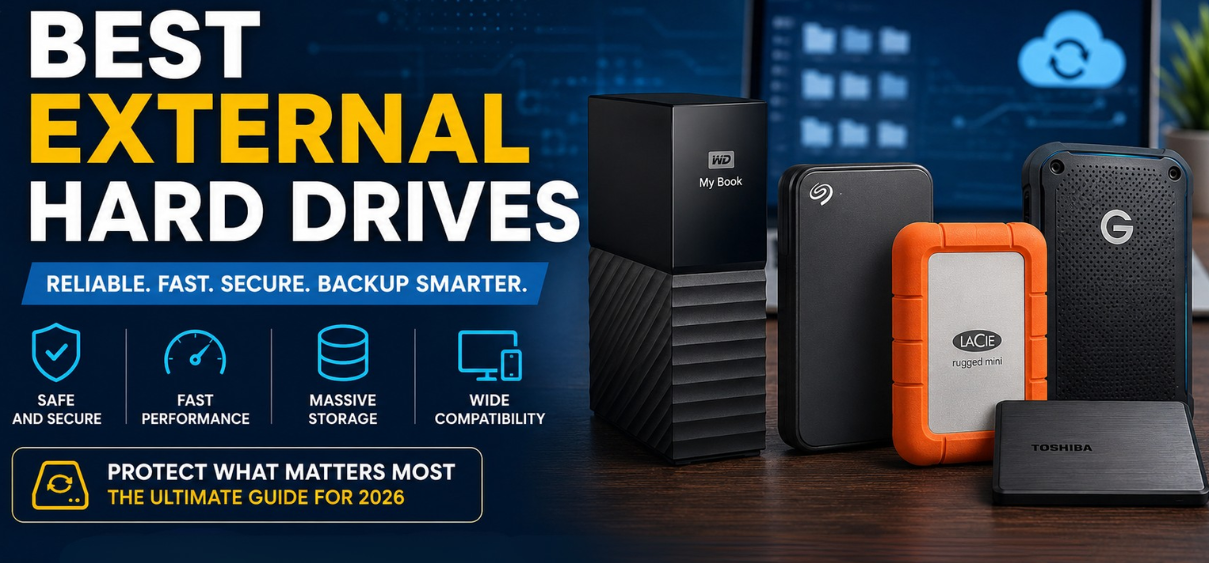
Best External Hard Drives
In today's digital world, data has become one of our most valuable assets. Whether we are storing family photos, business documents, creative projects, videos, games, software archives, or important work files, protecting our data from accidental deletion, hardware failure, cyber threats, and system crashes is essential. An external hard drive remains one of the most practical, cost-effective, and dependable backup solutions available.
Modern external hard drives offer impressive storage capacities, faster transfer speeds, enhanced durability, improved encryption features, and seamless compatibility across multiple operating systems. From compact portable drives designed for travel to high-capacity desktop drives built for extensi
ve backup tasks, there is a storage solution for every user.
This comprehensive guide explores the best external hard drives for backup in 2026, helping us identify the ideal storage device based on performance, reliability, capacity, and value.
Why External Hard Drives Remain Essential for Backup
Cloud storage services continue to grow in popularity, but external hard drives remain a crucial component of any backup strategy.
Key Advantages
- One-time purchase without monthly fees
- Large storage capacities
- Fast file transfers
- Offline data protection
- Enhanced privacy and security
- Easy disaster recovery
- Compatible with Windows, macOS, Linux, and gaming consoles
- Ideal for large media libraries
A reliable backup strategy often combines cloud storage and local external storage for maximum protection.
What to Look for When Buying an External Hard Drive
Before selecting a backup drive, we should evaluate several important factors.
Storage Capacity
Capacity requirements vary significantly.
| User Type | Recommended Capacity |
|---|---|
| Students | 1TB to 2TB |
| Home Users | 2TB to 4TB |
| Professionals | 4TB to 8TB |
| Photographers | 8TB+ |
| Videographers | 12TB+ |
| Businesses | 16TB+ |
Transfer Speed
External hard drives generally connect using:
| Interface | Maximum Speed |
| USB 3.0 | 5 Gbps |
| USB 3.2 Gen 1 | 5 Gbps |
| USB 3.2 Gen 2 | 10 Gbps |
| USB-C | Varies |
| Thunderbolt | Up to 40 Gbps |
Although traditional HDDs cannot fully utilize Thunderbolt speeds, faster interfaces improve overall performance.
Durability
Important features include:
- Shock resistance
- Water resistance
- Dust protection
- Reinforced casing
- Drop protection
Durability becomes especially important for travelers and field professionals.
Security Features
Modern drives often include:
- Hardware encryption
- Password protection
- Secure backup software
- Automatic backup scheduling
Best Overall External Hard Drive for Backup
Western Digital My Book
Key Specifications
| Feature | Details |
| Capacity | Up to 22TB |
| Interface | USB 3.2 |
| Encryption | 256-bit AES |
| Form Factor | Desktop |
Why We Recommend It
The Western Digital My Book remains one of the most trusted desktop backup solutions available. It combines enormous storage capacity with dependable performance and integrated security features.
Pros
- Massive storage capacities
- Reliable long-term performance
- Excellent backup software
- Strong encryption
Cons
- Requires external power
- Less portable
Best For
- Home backups
- Business archives
- Media collections
- Long-term storage
Best Portable External Hard Drive
Seagate Backup Plus Portable
Key Specifications
| Feature | Details |
| Capacity | Up to 5TB |
| Interface | USB 3.0 |
| Weight | Lightweight |
| Compatibility | Windows & Mac |
Why It Stands Out
The Seagate Backup Plus Portable delivers excellent portability while maintaining strong performance for everyday backup tasks.
Pros
- Compact design
- Affordable pricing
- Easy setup
- Reliable backup software
Cons
- Limited maximum capacity
Best For
- Students
- Travelers
- Everyday users
Best Rugged External Hard Drive
LaCie Rugged Mini
The LaCie Rugged series has become synonymous with durability.
Features
- Shock resistant
- Drop resistant
- Rain resistant
- Compact design
Advantages
Photographers, videographers, and field professionals often rely on the LaCie Rugged Mini due to its ability to withstand challenging environments.
Best For
- Outdoor professionals
- Travel content creators
- Field researchers
Best High-Capacity External Hard Drive
Seagate Expansion Desktop
For users requiring enormous storage capacity at a reasonable price, the Seagate Expansion Desktop remains an outstanding choice.
Available Capacities
- 8TB
- 10TB
- 12TB
- 16TB
- 20TB+
- 24TB models
Advantages
- Excellent value per terabyte
- Reliable operation
- Easy plug-and-play installation
Best For
- Large media collections
- Home servers
- Business archives
Best External Hard Drive for Mac Users
WD My Passport for Mac
Apple users benefit from optimized compatibility and Time Machine support.
Features
- Native macOS compatibility
- USB-C support
- Automatic backups
- Password protection
Advantages
The drive works seamlessly with Apple's backup ecosystem while offering portability and strong performance.
Best External Hard Drive for Windows Users
Toshiba Canvio Flex
The Toshiba Canvio Flex offers broad compatibility and reliable backup functionality.
Highlights
- USB-C connectivity
- Cross-platform support
- High reliability
- Competitive pricing
Best For
- Windows users
- Mixed-device households
- Office environments
Best External Hard Drive for Photographers
Professional photographers generate thousands of high-resolution files every month.
SanDisk Professional G-Drive ArmorATD
Benefits
- Rugged design
- Fast transfer rates
- Premium construction
- Excellent reliability
Why Photographers Love It
RAW image libraries require substantial storage space and dependable backup protection. The ArmorATD addresses both needs effectively.
Best External Hard Drive for Video Editors
Video projects often consume terabytes of storage.
G-Technology G-Drive
Advantages
- High capacity
- Fast sustained transfer speeds
- Professional-grade reliability
Perfect For
- 4K editing
- 8K workflows
- Large production environments
External HDD vs External SSD
Many buyers wonder whether they should purchase an HDD or SSD.
External HDD Advantages
- Lower cost per gigabyte
- Larger capacities
- Excellent for archival storage
External SSD Advantages
- Faster performance
- Better shock resistance
- Silent operation
Comparison Table
| Feature | HDD | SSD |
| Price | Lower | Higher |
| Capacity | Higher | Lower |
| Speed | Moderate | Extremely Fast |
| Durability | Good | Excellent |
| Lifespan | Long | Long |
For large-scale backups, HDDs remain the most economical choice.
How Much Storage Do We Need?
Storage requirements continue growing rapidly.
Typical File Sizes
| File Type | Average Size |
| Photos | 5 MB to 50 MB |
| RAW Photos | 20 MB to 100 MB |
| HD Movies | 4 GB to 10 GB |
| 4K Videos | 20 GB to 100 GB |
| Games | 50 GB to 250 GB |
A 4TB drive is often ideal for most households, while professionals may require 8TB or more.
Best Backup Practices
Owning a backup drive is only part of the solution.
Follow the 3-2-1 Backup Rule
- Keep 3 copies of data
- Store data on 2 different media types
- Keep 1 copy offsite
This strategy significantly reduces data loss risks.
How Long Do External Hard Drives Last?
Most quality external hard drives last:
- 3 to 5 years under heavy use
- 5 to 8 years under moderate use
- Up to 10 years with careful maintenance
Factors affecting lifespan include:
- Temperature
- Physical impacts
- Power fluctuations
- Usage frequency
Tips for Extending Hard Drive Lifespan
Best Practices
- Avoid dropping the drive
- Store in cool environments
- Safely eject before unplugging
- Run periodic health checks
- Maintain multiple backups
- Protect from moisture
- Use surge protection
Common External Hard Drive Problems
Drive Not Detected
Possible causes:
- Faulty cable
- Driver issues
- Power supply problems
Slow Transfer Speeds
Possible causes:
- Fragmentation
- USB limitations
- Background software
Corrupted Files
Possible causes:
- Unsafe removal
- Power interruptions
- Hardware failure
Routine maintenance helps prevent most issues.
Best External Hard Drives for Different Users
| User Type | Recommended Drive |
| Students | Seagate Backup Plus Portable |
| Families | WD My Book |
| Professionals | G-Drive |
| Photographers | SanDisk Professional ArmorATD |
| Travelers | LaCie Rugged Mini |
| Businesses | Seagate Expansion Desktop |
| Mac Users | WD My Passport for Mac |
| Windows Users | Toshiba Canvio Flex |
Future of External Backup Storage
Storage technology continues advancing through:
- Higher capacities
- Faster interfaces
- Enhanced encryption
- AI-assisted backup management
- Hybrid cloud integration
- Improved durability
Future external hard drives will likely become even more efficient, secure, and user-friendly.
Conclusion
The best external hard drive for backup depends on our specific storage requirements, budget, workflow, and portability needs. Portable drives offer convenience for everyday users, while desktop drives provide exceptional capacity for extensive backup operations. Reliable brands such as Western Digital, Seagate, Toshiba, LaCie, and SanDisk continue delivering dependable solutions for protecting valuable data.
Whether we need a compact travel companion, a rugged field-storage solution, or a massive desktop archive, investing in a high-quality external hard drive remains one of the smartest decisions we can make for safeguarding digital information.
25 (FAQs)
1. What is the best external hard drive for backup?
Western Digital My Book is among the best overall options.
2. Is SSD better than HDD for backups?
SSDs are faster, while HDDs provide better value per terabyte.
3. How much storage do I need?
Most users benefit from 2TB to 4TB.
4. How long do external hard drives last?
Typically 3 to 8 years depending on usage.
5. Can external hard drives fail suddenly?
Yes, which is why multiple backups are recommended.
6. Are external hard drives safe for long-term storage?
Yes, when stored properly.
7. Which brand is most reliable?
Western Digital, Seagate, Toshiba, and SanDisk are highly respected.
8. What is the fastest connection type?
Thunderbolt offers the highest speeds.
9. Can I use one drive for Windows and Mac?
Yes, with proper formatting.
10. Is cloud backup enough?
Combining cloud and local backups provides maximum protection.
11. Are portable drives durable?
Many models offer excellent durability.
12. Do external drives require power adapters?
Desktop drives usually do; portable drives typically do not.
13. What is hardware encryption?
Built-in security that protects stored data.
14. Can I backup my phone to an external drive?
Yes, using compatible adapters or software.
15. What size drive is best for photos?
At least 4TB for serious photographers.
16. What size drive is best for video editing?
8TB or larger is recommended.
17. Are external drives good for gaming?
Yes, especially for storing large game libraries.
18. Can viruses infect external drives?
Yes, security software is recommended.
19. Should I leave my drive connected all the time?
Only when necessary for backups.
20. What file system should I use?
NTFS, exFAT, or APFS depending on devices.
21. Can external drives be repaired?
Sometimes, depending on the issue.
22. What is the best budget backup drive?
Seagate Backup Plus Portable offers strong value.
23. How often should backups be performed?
Daily or weekly depending on data importance.
24. Can external drives work with NAS systems?
Many models are compatible.
25. What backup strategy is best?
The 3-2-1 backup method remains the gold standard.