
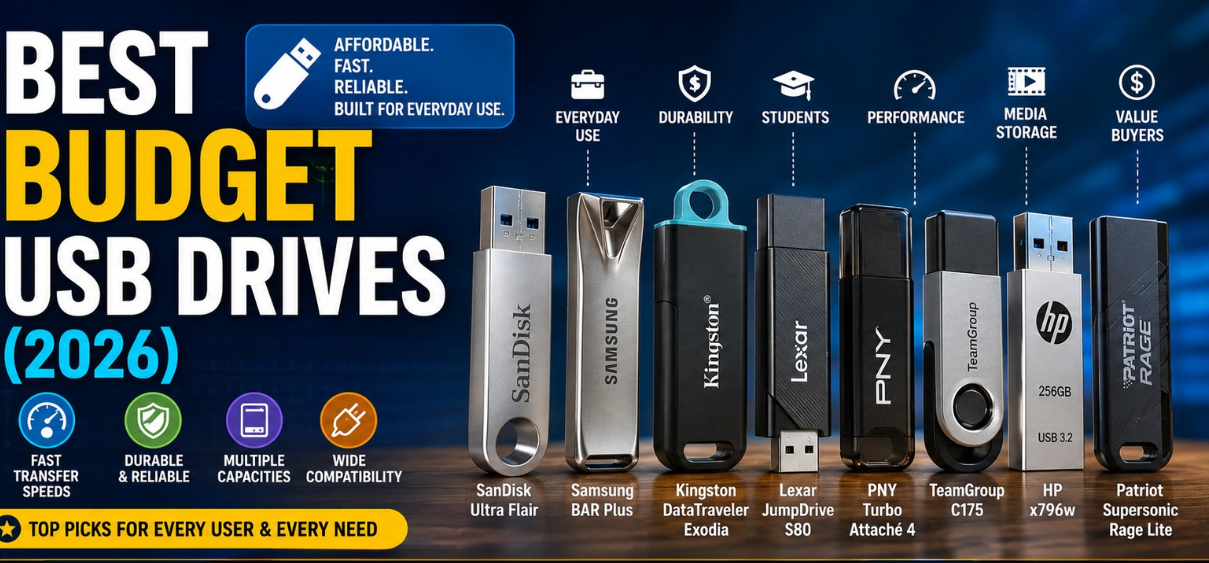
Best Budget USB Drives (2026)
In an era dominated by cloud storage, USB flash drives continue to remain one of the most practical, portable, and cost-effective storage solutions available. Whether we need to transfer files between devices, create backups, carry important documents, store multimedia collections, or transport work projects, a reliable USB drive remains an essential tool.
The good news is that modern budget USB drives have become significantly faster, more durable, and more spacious than previous generations. Today, even affordable flash drives offer impressive storage capacities, high-speed USB 3.2 connectivity, robust build quality, and broad compatibility across computers, gaming consoles, smart TVs, and mobile devices.
Choosing the right USB drive requires balancing storage capacity, transfer speeds, reliability, portability, and price. This comprehensive guide exploresBest Budget USB Drives vailable in 2026 and helps identify the ideal option for every type of user.the best budget USB drives a
Quick Comparison Table: Best Budget USB Drives
| USB Drive | Capacity Options | USB Standard | Read Speed | Best For |
|---|---|---|---|---|
| SanDisk Ultra Flair | 32GB–512GB | USB 3.0 | Up to 150 MB/s | Everyday Use |
| Samsung BAR Plus | 64GB–512GB | USB 3.1 | Up to 400 MB/s | Durability |
| Kingston DataTraveler Exodia | 32GB–256GB | USB 3.2 | Up to 100 MB/s | Students |
| Lexar JumpDrive S80 | 32GB–256GB | USB 3.1 | Up to 150 MB/s | Budget Performance |
| PNY Turbo Attaché 4 | 32GB–256GB | USB 3.0 | Up to 80 MB/s | Basic Storage |
| TeamGroup C175 | 32GB–256GB | USB 3.2 | Up to 100 MB/s | Value Buyers |
| HP x796w | 64GB–512GB | USB 3.2 | Up to 200 MB/s | Multimedia Storage |
| Patriot Supersonic Rage Lite | 32GB–256GB | USB 3.2 | Up to 180 MB/s | Fast Transfers |
Why USB Flash Drives Still Matter in 2026
Despite the widespread adoption of cloud platforms, USB drives continue to offer unique advantages:
- Instant access without internet connectivity
- Portable storage for travel
- Fast file transfers
- Convenient backup solution
- Enhanced privacy compared to cloud storage
- Compatibility with nearly all operating systems
- Support for gaming consoles and smart devices
- Affordable long-term storage
Many users appreciate the simplicity of plugging in a flash drive and immediately accessing files without subscriptions, passwords, or network dependencies.
SanDisk Ultra Flair: Best Overall Budget USB Drive
The SanDisk Ultra Flair remains one of the strongest choices in the budget category.
Key Features
- Durable metal housing
- USB 3.0 connectivity
- Up to 150 MB/s read speeds
- Wide range of capacities
- Compact design
Advantages
The metal construction provides excellent durability compared to plastic alternatives. Large file transfers complete quickly, making it suitable for work documents, photos, videos, and software files.
Ideal Users
- Students
- Office workers
- Home users
- Travelers
The balance between price, performance, and reliability makes this one of the most versatile budget USB drives available.
Samsung BAR Plus: Best Premium Budget Choice
Samsung has established a reputation for producing high-quality storage products, and the BAR Plus continues to impress.
Key Features
- Metal unibody construction
- Water resistance
- Shock resistance
- Magnet resistance
- USB 3.1 performance
Advantages
The drive offers exceptional durability while maintaining impressive transfer speeds. Its premium design feels significantly more expensive than its actual cost.
Ideal Users
- Professionals
- Frequent travelers
- Students carrying important projects
- Users seeking maximum reliability
Samsung's engineering makes this one of the safest long-term storage investments among affordable USB drives.
Kingston DataTraveler Exodia: Best Budget Drive for Students
Students frequently require affordable storage for assignments, presentations, PDFs, and multimedia files.
Key Features
- Lightweight design
- Protective cap
- USB 3.2 support
- Competitive pricing
- Multiple storage options
Advantages
The DataTraveler Exodia offers dependable performance without unnecessary extras that increase costs.
Ideal Uses
- Academic projects
- Classroom presentations
- Study materials
- Personal backups
Its affordability allows students to obtain significant storage without straining their budget.
Lexar JumpDrive S80: Best Speed for the Money
Performance-focused buyers often choose the Lexar JumpDrive S80.
Key Features
- USB 3.1 interface
- Fast transfer rates
- Retractable connector
- Compact form factor
Advantages
The drive delivers speeds that rival more expensive competitors while maintaining budget-friendly pricing.
Best For
- Large video files
- Creative professionals
- Fast document transfers
- Frequent data movement
Users who regularly transfer gigabytes of data will appreciate its efficient performance.
PNY Turbo Attaché 4: Best Entry-Level USB Drive
The PNY Turbo Attaché 4 targets users seeking affordability above all else.
Key Features
- Budget pricing
- Lightweight construction
- Plug-and-play functionality
- Broad compatibility
Advantages
The drive performs well for everyday tasks including document storage, photos, and music collections.
Best For
- Casual users
- Home storage
- School assignments
- Basic backups
Its low cost makes it an excellent option for users who need simple storage without premium features.
TeamGroup C175: Best Value USB Flash Drive
TeamGroup continues gaining popularity due to strong value propositions.
Key Features
- Affordable pricing
- Rotating cap design
- USB 3.2 connectivity
- Multiple capacity options
Advantages
The rotating design protects the connector while eliminating the risk of losing a removable cap.
Best For
- Everyday users
- Office environments
- Portable file storage
The combination of convenience and affordability makes it a standout value option.
HP x796w: Best Budget USB Drive for Media Storage
Users with large photo, music, and video libraries often require greater capacity and faster transfer rates.
Key Features
- Sleek metal design
- High read speeds
- Multiple storage capacities
- USB 3.2 support
Advantages
The drive handles large multimedia collections efficiently and offers dependable performance.
Best For
- Video storage
- Music collections
- Photography archives
- Personal media backups
Patriot Supersonic Rage Lite: Best Budget Drive for Performance
Performance enthusiasts frequently choose Patriot storage products.
Key Features
- USB 3.2 interface
- Fast sequential speeds
- Compact design
- Strong value proposition
Advantages
The drive provides excellent transfer performance while remaining competitively priced.
Best For
- Frequent transfers
- Gaming files
- Productivity workflows
- Large data movement
How to Choose the Best Budget USB Drive
Several factors should influence purchasing decisions.
Storage Capacity
32GB
Best for:
- Documents
- Presentations
- School projects
64GB
Best for:
- Photos
- Work files
- Everyday storage
128GB
Best for:
- Multimedia collections
- Larger backups
- Gaming files
256GB+
Best for:
- Professional use
- Video storage
- Extensive archives
Transfer Speeds
Higher transfer speeds significantly reduce waiting times.
USB 2.0
- Basic performance
- Suitable for documents
- Slower large file transfers
USB 3.0
- Major speed improvement
- Excellent for most users
USB 3.1
- Faster data movement
- Better for large files
USB 3.2
- Modern performance standard
- Ideal for power users
Build Quality
Durability becomes important for portable storage.
Look for:
- Metal housings
- Shock resistance
- Water resistance
- Temperature resistance
A durable USB drive often lasts significantly longer than cheaper plastic alternatives.
Compatibility
Modern USB drives typically support:
- Windows
- macOS
- Linux
- Smart TVs
- Gaming consoles
- Car audio systems
Always verify compatibility before purchasing.
Common USB Drive Uses
USB drives serve a wide variety of purposes.
Personal Storage
Store photos, videos, and documents securely.
Business Applications
Carry presentations, spreadsheets, and project files.
Educational Use
Transfer assignments and coursework efficiently.
Media Playback
Play movies and music on TVs and entertainment systems.
System Recovery
Create bootable recovery and installation drives.
Backup Storage
Maintain offline copies of critical files.
Advantages of Buying Budget USB Drives
Affordable USB drives now deliver benefits once reserved for premium models.
Benefits Include
- Lower costs
- Larger capacities
- Improved reliability
- Faster speeds
- Better durability
- Universal compatibility
Modern budget drives offer remarkable value for everyday users.
Tips for Extending USB Drive Lifespan
Following proper practices can significantly increase drive longevity.
Best Practices
- Safely eject before removal
- Avoid physical impacts
- Keep away from moisture
- Scan regularly for malware
- Maintain backup copies
- Avoid extreme temperatures
These simple habits help preserve data integrity and device reliability.
USB Drive Buying Checklist
Before purchasing, consider:
- Required storage capacity
- Desired transfer speed
- Durability needs
- Device compatibility
- Physical design
- Brand reputation
- Warranty coverage
- Budget constraints
A thoughtful evaluation ensures the best value.
Final Verdict
The best budget USB drive depends on individual requirements. The SanDisk Ultra Flair delivers the strongest balance of affordability and performance. Samsung BAR Plus offers superior durability and premium construction. Kingston DataTraveler Exodia provides excellent value for students, while the Lexar JumpDrive S80 excels in speed-focused workloads.
Regardless of the specific model selected, today's budget USB drives offer remarkable performance, reliability, and storage capacity at highly accessible prices. For everyday backups, multimedia storage, educational use, and professional file transfers, affordable flash drives remain one of the most practical technology purchases available.
(FAQs)
1. What is the best budget USB drive?
SanDisk Ultra Flair is widely considered one of the best overall budget options.
2. Is USB 3.0 faster than USB 2.0?
Yes, USB 3.0 offers significantly faster transfer speeds.
3. How much storage do I need?
Most users find 64GB to 128GB sufficient.
4. Are USB drives reliable?
Yes, when purchased from reputable brands.
5. Can USB drives store videos?
Absolutely.
6. How long do flash drives last?
Typically several years with normal use.
7. Are metal USB drives better?
They are generally more durable.
8. Can USB drives be used on Macs?
Yes.
9. Can they work with TVs?
Most modern TVs support USB storage.
10. What is USB 3.2?
A newer and faster USB standard.
11. Are flash drives waterproof?
Some models offer water resistance.
12. Is 32GB enough?
For documents and light storage, yes.
13. Can I store movies?
Yes.
14. Which brand is most reliable?
Samsung, SanDisk, Kingston, and Lexar are highly trusted.
15. Are USB drives secure?
Many support encryption software.
16. Can I use them for backups?
Yes.
17. What is a bootable USB?
A drive containing operating system installation files.
18. Do USB drives wear out?
Eventually, after extensive write cycles.
19. Can they transfer photos?
Yes.
20. What capacity is best for students?
64GB to 128GB.
21. Are cheap USB drives worth buying?
Quality budget models offer excellent value.
22. Do they require internet access?
No.
23. Can they store software?
Yes.
24. Are USB drives portable?
Extremely portable.
25. Which budget drive offers the best value?
The Kingston DataTraveler Exodia and SanDisk Ultra Flair are excellent value choices.