
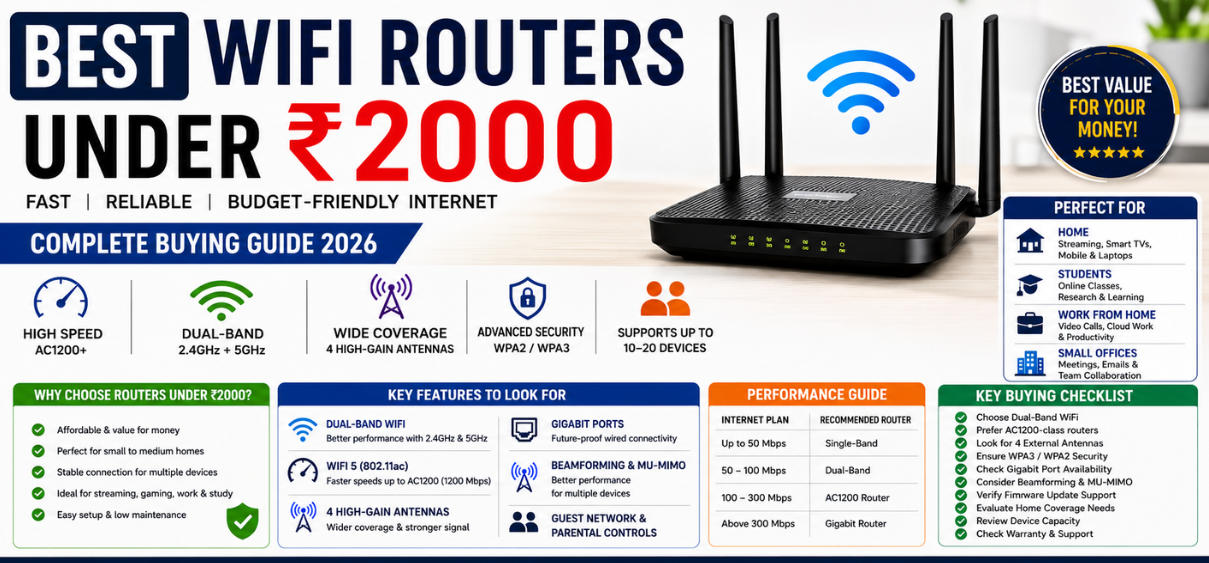
Best WiFi Routers Under ₹2000
A reliable internet connection has become essential for work, online learning, entertainment, gaming, video streaming, and smart home devices. While premium networking equipment can be expensive, several excellent WiFi routers under ₹2000 deliver impressive performance, strong coverage, advanced security, and stable connectivity without stretching your budget.
The latest budget routers offer features once reserved for premium devices, including dual-band connectivity, MU-MIMO technology, beamforming, parental controls, guest networks, IPv6 support, and enhanced wireless security. Whether we need a router for a small apartment, a medium-sized home, a student hostel room, or a small office, there are excellent affordable options available.
This comprehensive guide covers everything required to choose the best WiFi router under ₹2000, including features, performance expectations, technical specifications, buying considerations, and frequently asked questions.
Why Buy a WiFi Router Under ₹2000?
Modern budget routers offer exceptional value and are suitable for most internet users.
Affordable Connectivity
Budget routers provide dependable internet access without requiring a significant investment.
Key Benefits
-
Cost-effective networking solution
-
Suitable for home users
-
Easy installation
-
Low maintenance costs
-
Excellent value for money
Perfect for Small and Medium Homes
Most routers in this price range comfortably support:
-
Online classes
-
Video conferencing
-
OTT streaming
-
Social media browsing
-
Work-from-home activities
-
Smart TVs
-
Smartphones
-
Laptops
Improved Internet Coverage
Modern routers utilize advanced antenna technology to improve wireless coverage.
Benefits include:
-
Better signal penetration
-
Reduced dead zones
-
Improved stability
-
Consistent speeds
Top Features to Look for in the Best WiFi Router Under ₹2000
Dual-Band WiFi Support
Dual-band routers operate on both:
-
2.4 GHz
-
5 GHz
Advantages of Dual-Band WiFi
| Feature | 2.4 GHz | 5 GHz |
|---|---|---|
| Coverage | Longer Range | Shorter Range |
| Speed | Moderate | Faster |
| Interference | Higher | Lower |
| Streaming | Good | Excellent |
| Gaming | Average | Better |
Dual-band routers provide improved performance and reduced congestion.
WiFi Standards
The wireless standard determines overall performance.
Common Standards
| Standard | Maximum Speed |
|---|---|
| WiFi 4 (802.11n) | Up to 300 Mbps |
| WiFi 5 (802.11ac) | Up to 1200 Mbps |
| WiFi 6 (802.11ax) | Higher-end models |
For under ₹2000, WiFi 5 routers generally offer the best value.
Antenna Configuration
External antennas significantly influence signal strength.
Look for:
-
Two antennas
-
Four antennas
-
High-gain antennas
More antennas generally improve coverage and signal stability.
Gigabit vs Fast Ethernet Ports
Ethernet ports affect wired connection speeds.
Fast Ethernet
-
Up to 100 Mbps
Gigabit Ethernet
-
Up to 1000 Mbps
Gigabit ports provide superior future-proofing.
Best WiFi Router Types Under ₹2000
Single-Band Routers
Single-band routers operate exclusively on 2.4 GHz.
Suitable For
-
Basic browsing
-
Email usage
-
Light streaming
-
Small households
Advantages
-
Lower cost
-
Wider coverage
-
Simple setup
Dual-Band Routers
Dual-band routers provide significantly improved performance.
Best For
-
HD streaming
-
Multiple users
-
Online gaming
-
Video conferencing
Advantages
-
Faster speeds
-
Less interference
-
Better user experience
Performance Factors That Matter
Internet Speed Compatibility
Router performance should align with your ISP plan.
| Internet Plan | Recommended Router |
|---|---|
| Up to 50 Mbps | Single-Band |
| 50–100 Mbps | Dual-Band |
| 100–300 Mbps | AC1200 Router |
| Above 300 Mbps | Gigabit Router |
Device Capacity
Modern households often connect numerous devices simultaneously.
Examples include:
-
Smartphones
-
Smart TVs
-
Security cameras
-
Laptops
-
Tablets
-
Gaming consoles
A good router under ₹2000 should handle 10–20 devices comfortably.
Range and Coverage
Coverage depends on:
-
Antenna quality
-
Home layout
-
Wall thickness
-
Router placement
Most routers in this category adequately cover:
-
1 BHK homes
-
2 BHK homes
-
Small offices
Important Security Features
WPA3 Security
WPA3 offers stronger protection than older protocols.
Benefits include:
-
Enhanced encryption
-
Better privacy
-
Improved password protection
Guest Network Support
Guest networks allow visitors to access the internet without accessing your private devices.
Advantages:
-
Improved security
-
Better network management
-
Safer device isolation
Parental Controls
Parental control features help manage internet usage.
Functions may include:
-
Website filtering
-
Time restrictions
-
Device monitoring
-
Usage scheduling
Router Technologies That Improve Performance
MU-MIMO Technology
MU-MIMO enables simultaneous communication with multiple devices.
Benefits include:
-
Reduced lag
-
Better speed distribution
-
Improved multitasking
Beamforming Technology
Beamforming directs wireless signals toward connected devices.
Advantages:
-
Stronger signals
-
Improved stability
-
Better coverage
Quality of Service (QoS)
QoS prioritizes important network traffic.
Ideal for:
-
Video calls
-
Gaming
-
Streaming
-
Business applications
How to Choose the Best WiFi Router Under ₹2000
Consider Your Home Size
Small Rooms
A standard dual-antenna router is usually sufficient.
Apartments
Dual-band routers with four antennas provide better performance.
Multi-Room Homes
Look for beamforming and stronger antenna configurations.
Evaluate Internet Usage
Different users require different capabilities.
Casual Users
-
Browsing
-
Email
-
Social media
Heavy Users
-
Streaming
-
Gaming
-
Remote work
-
Cloud storage
Heavy users benefit from AC1200-class routers.
Check Firmware Support
Regular firmware updates improve:
-
Security
-
Stability
-
Compatibility
-
Performance
Choose brands known for ongoing software support.
Common WiFi Problems and Solutions
Slow Internet Speed
Possible causes:
-
Poor placement
-
Network congestion
-
Outdated firmware
Solutions:
-
Relocate router
-
Update firmware
-
Use dual-band WiFi
Weak Signal
Possible causes:
-
Thick walls
-
Long distance
-
Interference
Solutions:
-
Optimize placement
-
Upgrade antennas
-
Use WiFi extenders
Frequent Disconnections
Possible causes:
-
ISP issues
-
Firmware bugs
-
Overloaded network
Solutions:
-
Restart router
-
Update software
-
Reduce connected devices
Router Placement Tips for Maximum Coverage
Proper placement dramatically improves performance.
Best Practices
-
Place centrally in the home
-
Keep elevated
-
Avoid metal objects
-
Stay away from microwaves
-
Maintain clear surroundings
Avoid
-
Floor placement
-
Enclosed cabinets
-
Behind televisions
-
Near large appliances
Advantages of Buying a Budget WiFi Router
Excellent Value
Affordable routers deliver substantial performance for everyday tasks.
Easy Installation
Most models feature:
-
Quick setup apps
-
Browser configuration
-
Plug-and-play functionality
Low Power Consumption
Budget routers typically consume minimal electricity.
Reliable Connectivity
Modern budget routers provide surprisingly stable performance for most users.
Best Use Cases for WiFi Routers Under ₹2000
Home Internet
Perfect for families requiring stable connectivity.
Students
Ideal for:
-
Online learning
-
Research
-
Video lectures
Small Offices
Suitable for:
-
Email
-
Cloud collaboration
-
Video meetings
Rental Apartments
Affordable and easy to relocate.
Future Trends in Budget WiFi Routers
Networking technology continues to evolve rapidly.
Upcoming improvements include:
-
Better WiFi 6 adoption
-
Enhanced security
-
AI-powered optimization
-
Smarter traffic management
-
Improved energy efficiency
-
Greater device capacity
Budget routers are expected to deliver even higher performance levels in the coming years.
Conclusion
The best WiFi routers under ₹2000 offer an outstanding balance of affordability, performance, security, and reliability. Modern budget routers are capable of supporting streaming, gaming, remote work, online education, and smart home connectivity while maintaining strong wireless coverage and stable internet access.
By selecting a router with dual-band support, strong antenna performance, advanced security features, and modern wireless standards, users can significantly improve their internet experience without exceeding their budget. For most households and small offices, a well-chosen router under ₹2000 provides everything necessary for fast, dependable connectivity.
Comparison Table: Features to Consider
| Feature | Recommended Specification |
|---|---|
| WiFi Standard | WiFi 5 (802.11ac) |
| Bands | Dual-Band |
| Speed | AC1200 or Higher |
| Antennas | 4 High-Gain Antennas |
| Security | WPA2/WPA3 |
| Ports | Gigabit Preferred |
| Device Support | 10–20 Devices |
| Coverage | 1000–1500 sq. ft. |
| Beamforming | Recommended |
| MU-MIMO | Recommended |
FAQs
1. Which is the best WiFi router under ₹2000?
Dual-band AC1200 routers generally provide the best value.
2. Is a router under ₹2000 good for streaming?
Yes, especially dual-band models.
3. Can budget routers support gaming?
Yes, for casual and moderate gaming.
4. What is dual-band WiFi?
A router supporting both 2.4GHz and 5GHz frequencies.
5. Is AC1200 sufficient for home use?
Yes, it suits most households.
6. How many devices can connect?
Typically 10–20 devices.
7. Does antenna count matter?
Yes, more antennas generally improve coverage.
8. Is WPA3 necessary?
It provides enhanced security.
9. What is beamforming?
Technology that directs signals toward devices.
10. What is MU-MIMO?
Technology enabling simultaneous device communication.
11. Can I use the router with fiber internet?
Yes, if specifications support your plan speed.
12. Are Gigabit ports important?
They improve wired network performance.
13. How long does a router last?
Usually 4–6 years.
14. Can routers under ₹2000 cover a 2 BHK home?
Most quality models can.
15. Do these routers support smart TVs?
Yes.
16. Can they support work-from-home setups?
Absolutely.
17. Are parental controls available?
Many models include them.
18. Can I create a guest network?
Many dual-band routers support this feature.
19. Is installation difficult?
No, setup is generally straightforward.
20. Can routers improve internet speed?
They optimize distribution but cannot exceed ISP limits.
21. How often should firmware be updated?
Whenever updates are released.
22. What causes WiFi dead zones?
Distance, walls, and interference.
23. Should I place the router centrally?
Yes, for optimal coverage.
24. Is WiFi 5 still good in 2026?
Yes, it remains highly capable.
25. Are routers under ₹2000 worth buying?
Yes, they provide excellent value for most users.