
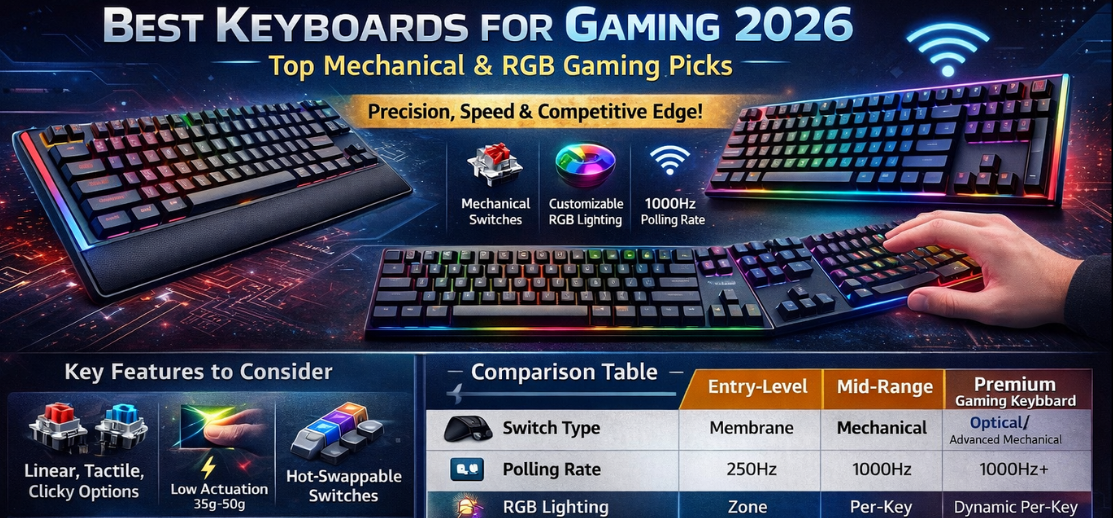
In competitive gaming, milliseconds determine victory. A powerful GPU and high-refresh-rate monitor matter, but the best gaming keyboard is the foundation of control, execution, and responsiveness. From rapid key presses in FPS battles to macro-intensive MMO sessions, a professional-grade gaming keyboard transforms reaction time into measurable performance gains.
We present a comprehensive, deeply detailed guide to choosing the best keyboards for gaming, engineered for competitive players, esports enthusiasts, streamers, and performance-driven professionals. This guide covers mechanical switch science, latency optimization, build quality, customization, software ecosystems, and competitive-grade durability.
Why the Best Gaming Keyboard Defines Competitive Advantage
A standard office keyboard cannot withstand high-intensity gaming. Advanced gaming keyboards deliver:
-
Ultra-fast actuation
-
N-key rollover accuracy
-
Anti-ghosting precision
-
Premium mechanical switches
-
Customizable RGB lighting
-
Tournament-ready durability
Each component influences input speed, tactile feedback, and long-term resilience under pressure.
Key Features to Consider in the Best Keyboards for Gaming
1. Mechanical vs Membrane: Performance Comparison
| Feature | Mechanical Keyboard | Membrane Keyboard |
|---|---|---|
| Response Time | Extremely Fast | Moderate |
| Durability | 50–100 million keystrokes | 5–10 million |
| Tactile Feedback | High Precision | Soft |
| Customization | Advanced | Limited |
| Competitive Gaming | Ideal | Not Recommended |
A mechanical gaming keyboard is the industry standard for serious players. Individual switches beneath each key provide consistent actuation, faster reset, and superior feedback.
2. Mechanical Switch Types – Linear, Tactile, Clicky
The switch determines feel, speed, and sound.
Linear Switches
-
Smooth keystrokes
-
Silent operation
-
Fast actuation
-
Ideal for FPS and rapid tapping
Tactile Switches
-
Noticeable bump at actuation
-
Balanced feedback
-
Ideal for MOBA and RPG
Clicky Switches
-
Audible click
-
Strong tactile feedback
-
Ideal for players who prefer confirmation
Switch choice depends on play style and preference, but competitive esports environments often favor linear switches for speed and consistency.
3. Actuation Force and Travel Distance
Professional gaming keyboards feature:
-
Low actuation force (35g–50g)
-
Short actuation distance (1.0mm–2.0mm)
-
Rapid trigger reset technology
Reduced key travel translates to faster double taps and instant directional movement.
4. Anti-Ghosting and N-Key Rollover
In intense matches, multiple keys are pressed simultaneously. High-end gaming keyboards provide:
-
Full N-key rollover
-
100% anti-ghosting
-
Zero missed inputs
This ensures every command registers accurately during critical gameplay moments.
Keyboard Form Factors for Gaming
Full-Size Gaming Keyboards (100%)
Includes numeric keypad and full function row. Best for:
-
MMO players
-
Strategy gamers
-
Productivity + gaming users
Tenkeyless (TKL) Gaming Keyboards (87%)
Removes numeric pad, allowing more mouse space. Ideal for FPS gamers requiring low sensitivity movements.
60% and 65% Compact Gaming Keyboards

Minimalist design focused purely on performance. Compact keyboards are highly portable and popular among professional esports players.
Wired vs Wireless Gaming Keyboards
Wired Gaming Keyboards
-
Zero latency
-
No battery dependency
-
Stable tournament use
Wireless Gaming Keyboards
-
Clean desk setup
-
Advanced 2.4GHz low-latency tech
-
Bluetooth multi-device compatibility
Modern premium wireless keyboards now deliver near-zero latency, rivaling wired models.
RGB Lighting and Customization
Gaming keyboards feature:
-
Per-key RGB illumination
-
Dynamic lighting effects
-
Software synchronization
-
Reactive in-game lighting
Beyond aesthetics, RGB assists with key visibility during night gaming sessions and customizable WASD highlighting.
Build Quality and Materials
Premium gaming keyboards use:
-
Aircraft-grade aluminum frames
-
Double-shot PBT keycaps
-
Reinforced PCB boards
-
Braided USB cables
Durable construction ensures longevity through millions of keystrokes.
Software Integration and Macros
Advanced gaming keyboards offer proprietary software to:
-
Create macros
-
Program shortcuts
-
Customize RGB profiles
-
Adjust polling rates
-
Save onboard profiles
Macro functionality gives competitive advantages in MMO, RTS, and battle royale gameplay.
Latency, Polling Rate, and Response Time
Professional gaming keyboards deliver:
-
1000Hz polling rate
-
Ultra-low latency input
-
Debounce optimization
-
Rapid trigger activation
High polling rates ensure input registers instantly between keypress and in-game action.
Comparison Table – Best Keyboards for Gaming
| Feature | Entry Level | Mid-Range | Premium Gaming Keyboard |
|---|---|---|---|
| Switch Type | Membrane | Mechanical | Optical/Advanced Mechanical |
| Polling Rate | 250Hz | 1000Hz | 1000Hz+ |
| RGB Lighting | Zone | Per-Key | Dynamic Per-Key |
| Frame Material | Plastic | Reinforced | Aluminum Alloy |
| Software | Basic | Customizable | Advanced Macro Suite |
| Key Lifespan | 10M | 50M | 100M+ |
Best Gaming Keyboard for Different Gaming Genres
FPS Games
-
Linear switches
-
TKL or 60% form factor
-
Rapid actuation
-
Lightweight design
MMO Games
-
Dedicated macro keys
-
Full-size layout
-
Custom profile support
MOBA Games
-
Tactile switches
-
Precision feedback
-
Adjustable actuation
Battle Royale
-
Fast response
-
Compact layout
-
Customizable RGB zones
Ergonomics and Wrist Support
Gaming sessions extend for hours. Look for:
-
Detachable wrist rest
-
Adjustable feet
-
Low-profile keycaps
-
Comfortable typing angle
Ergonomic support reduces fatigue and improves consistency during extended play.
Durability and Longevity
Premium gaming keyboards offer:
-
Water resistance
-
Dust protection
-
Reinforced stabilizers
-
Fade-resistant keycaps
Investing in durable components ensures lasting performance.
Future Trends in Gaming Keyboards
The gaming keyboard market is advancing with:
-
Optical-mechanical switches
-
Hall effect magnetic switches
-
Adjustable actuation points
-
Wireless charging
-
OLED display integration
These innovations enhance personalization and speed for competitive players.
How to Choose the Best Gaming Keyboard
When selecting your ideal keyboard, prioritize:
-
Switch preference
-
Form factor
-
Build quality
-
Software ecosystem
-
Latency performance
-
Customization options
A top-tier gaming keyboard combines speed, durability, and precision.
Conclusion – Elevate Performance with the Best Keyboards for Gaming
The right gaming keyboard is a competitive weapon. Precision switches, fast polling rates, durable construction, and customizable features create measurable performance advantages. Whether competing professionally or gaming enthusiastically, investing in a high-performance mechanical keyboard ensures faster input, consistent control, and long-lasting reliability.
FAQs
1. What is the best switch type for gaming?
Linear switches are preferred for speed.
2. Is mechanical better than membrane?
Yes, for precision and durability.
3. What polling rate is ideal?
1000Hz is industry standard.
4. Are wireless gaming keyboards fast?
Modern 2.4GHz models are extremely fast.
5. What is N-key rollover?
Registers all simultaneous key presses.
6. Are compact keyboards better?
Yes for FPS and portability.
7. How long do mechanical switches last?
Up to 100 million keystrokes.
8. Do I need RGB?
Optional, but useful in low light.
9. What size keyboard is best?
Depends on gaming style.
10. Are optical switches faster?
Yes, they reduce debounce delay.
11. Can I customize macros?
Yes, through keyboard software.
12. What is actuation distance?
Distance required to register a press.
13. Are aluminum frames better?
Yes, for durability.
14. What are PBT keycaps?
More durable and fade-resistant keycaps.
15. Is wrist rest important?
Highly recommended for long sessions.
16. Is 60% keyboard enough?
Yes, for competitive FPS.
17. What is debounce time?
Delay before key registers again.
18. Do gaming keyboards improve skill?
They enhance performance consistency.
19. Are hot-swappable switches useful?
Yes, for customization.
20. Can I use gaming keyboard for work?
Absolutely.
21. What is rapid trigger?
Instant reset for repeated presses.
22. Are clicky switches loud?
Yes, intentionally audible.
23. Is Bluetooth suitable for gaming?
Better for casual gaming.
24. What is onboard memory?
Saves settings without software.
25. How long does a gaming keyboard last?
3–7 years depending on usage.
For more information and to start using Roobai.com, visit our official website and download the app to stay updated on the best deals and offers. With Roobai.com, you can ensure that every shopping experience is not just an opportunity to shop but an opportunity to save big