
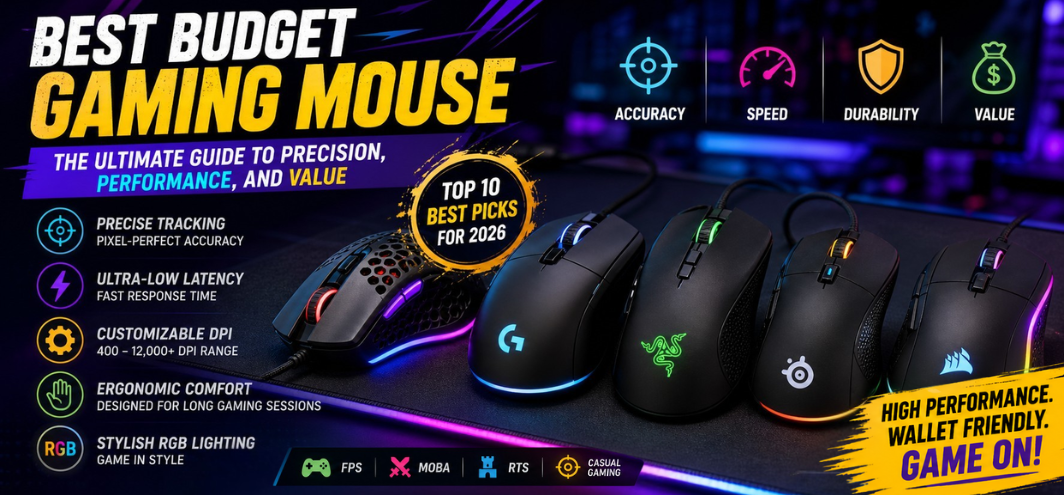
In the highly competitive world of gaming peripherals, selecting the best budget gaming mouse is no longer a compromise between cost and performance. We operate in an era where affordable gaming mice deliver elite-level precision, responsiveness, and durability, empowering gamers to achieve peak performance without exceeding budget constraints. This guide presents a comprehensive, data-driven, and performance-focused analysis of the top budget gaming mice available today.
Why Budget Gaming Mice Are Redefining Competitive Gaming
The modern budget gaming mouse has evolved into a high-performance tool engineered for accuracy, speed, and endurance. Manufacturers now integrate advanced optical sensors, lightweight materials, and customizable features into affordable models, ensuring that gamers experience:
- Pixel-perfect tracking accuracy
- Ultra-low latency response times
- Ergonomic comfort for extended sessions
- Customizable DPI and programmable buttons
These advancements make budget gaming mice a strategic investment for both casual and competitive players.
Key Features That Define the Best Budget Gaming Mouse
1. Sensor Quality and Precision
The sensor is the core of any gaming mouse. Top budget options now feature:
- Optical sensors with up to 12,000+ DPI
- High IPS (inches per second) tracking speeds
- Zero acceleration and minimal jitter
Brands like Logitech and Razer have introduced entry-level mice with flagship-grade sensors.
2. DPI Customization and Sensitivity Control
A high-quality budget mouse offers:
- Adjustable DPI settings (400–12,000+)
- On-the-fly sensitivity switching
- Software-based customization profiles
This enables precise control across FPS, MOBA, and RTS games.
3. Ergonomics and Comfort
Comfort directly impacts performance. The best models provide:
- Ergonomic shapes for palm, claw, and fingertip grips
- Lightweight construction (60g–90g)
- Textured grips for enhanced control
4. Build Quality and Durability
Durability is critical for long-term use:
- Mechanical switches rated for 10–50 million clicks
- Reinforced cables or wireless reliability
- High-quality plastic or hybrid materials
5. Wired vs Wireless Performance
Modern budget mice offer both:
- Wired mice for zero latency
- Wireless mice with low-latency 2.4GHz connectivity
6. RGB Lighting and Aesthetics
While not essential, many users prefer:
- Customizable RGB lighting
- Sleek gaming designs
- Software-controlled effects
Top 10 Best Budget Gaming Mouse in 2026
1. Logitech G203 Lightsync
The Logitech G203 Lightsync delivers exceptional value with reliable performance.
- 8,000 DPI optical sensor
- Lightsync RGB customization
- Lightweight and responsive design
- Affordable pricing
A perfect choice for entry-level competitive gaming.
2. Razer DeathAdder Essential
The Razer DeathAdder Essential remains a legendary ergonomic gaming mouse.
- 6,400 DPI optical sensor
- Ergonomic right-handed design
- Durable mechanical switches
- Classic gaming performance
Ideal for FPS players seeking comfort and control.
3. SteelSeries Rival 3
The SteelSeries Rival 3 offers precision tracking and premium build quality.
- TrueMove Core sensor
- Lightweight design
- Brilliant RGB lighting zones
- Excellent durability
A strong option for balanced gaming performance.
4. Corsair M55 RGB Pro
The Corsair M55 RGB Pro provides versatility and ambidextrous usability.
- 12,400 DPI sensor
- Ambidextrous design
- Programmable buttons
- Lightweight build
Suitable for left- and right-handed gamers.
5. Redragon M711 Cobra
The Redragon M711 Cobra is a budget powerhouse packed with features.
- 10,000 DPI sensor
- RGB lighting effects
- Programmable buttons
- Aggressive gaming design
Best for gamers seeking maximum features at low cost.
6. HyperX Pulsefire Core
The HyperX Pulsefire Core combines precision and simplicity.
- Pixart 3327 sensor
- Ergonomic design
- Durable construction
- Minimalist aesthetic
A reliable choice for consistent gaming performance.
7. Glorious Model O (Budget Variant)
The Glorious Model O is known for its ultra-lightweight design and speed.
- Honeycomb shell design
- Extremely lightweight (~67g)
- High DPI sensor
- Smooth glide feet
Perfect for fast-paced FPS gaming.
8. Cooler Master MM710
The Cooler Master MM710 emphasizes speed and precision.
- Ultra-lightweight design
- High-end sensor performance
- Minimal drag cable
- Ergonomic structure
Designed for competitive esports players.
9. HP M260 Gaming Mouse
The HP M260 offers budget-friendly performance with solid reliability.
- Adjustable DPI settings
- Simple ergonomic design
- Affordable pricing
- Decent build quality
Ideal for casual gamers and beginners.
10. Zebronics Zeb-Transformer M
The Zebronics Zeb-Transformer M is a popular budget choice in India.
- Multicolor LED lighting
- Comfortable grip
- Affordable price point
- Wide availability
A great entry-level option for budget-conscious users.
Budget Gaming Mouse vs Premium Gaming Mouse
| Feature | Budget Gaming Mouse | Premium Gaming Mouse |
|---|---|---|
| Price | Affordable | Expensive |
| Sensor Quality | High | Ultra-high |
| Build | Good | Premium |
| Features | Essential | Advanced |
| Customization | Moderate | Extensive |
Advantages of Budget Gaming Mice
- Affordable without sacrificing core performance
- Wide variety of options
- Lightweight and ergonomic designs
- Reliable sensors for competitive gaming
Limitations to Consider
- Fewer advanced customization options
- Lower-end materials in some models
- Limited wireless options in ultra-budget range
- Software ecosystems may be basic
Best Use Cases for Budget Gaming Mice
1. FPS Gaming
- Precise aiming
- Fast response times
- Low-latency tracking
2. MOBA and RTS Gaming
- Programmable buttons
- Quick command execution
- Smooth navigation
3. Casual Gaming
- Affordable performance
- Comfortable usage
- Plug-and-play convenience
How to Choose the Best Budget Gaming Mouse
When selecting the right mouse, prioritize:
- Sensor performance for accuracy
- Comfort based on grip style
- Weight for speed and control
- Build quality for durability
- Software support for customization
Future Trends in Budget Gaming Mice
- AI-enhanced sensor calibration
- Ultra-lightweight materials
- Improved wireless latency
- Eco-friendly manufacturing
- Advanced customization at lower price points
FAQs
1. What is the best budget gaming mouse?
Models like Logitech G203 and Razer DeathAdder Essential lead the category.
2. What DPI is ideal for gaming?
Between 800–3200 DPI for most users.
3. Are budget gaming mice reliable?
Yes, modern options are highly reliable.
4. Is wireless good for gaming?
Yes, modern wireless mice offer low latency.
5. What grip style matters?
Palm, claw, or fingertip depending on comfort.
6. Are lightweight mice better?
Yes, for fast-paced gaming.
7. Do I need RGB lighting?
No, it is purely aesthetic.
8. What sensor is best?
Optical sensors are preferred.
9. Can budget mice be used for esports?
Yes, many are competitive-ready.
10. How long do they last?
Typically 2–5 years.
11. Are wired mice faster?
Slightly, but wireless is comparable.
12. What is polling rate?
The frequency of data reporting (e.g., 1000Hz).
13. Are ambidextrous mice good?
Yes, for versatile use.
14. Can I customize buttons?
Yes, in most models.
15. Are budget mice heavy?
Most are lightweight.
16. Do they support macros?
Yes, via software.
17. Is build quality important?
Yes, for durability.
18. What brands are best?
Logitech, Razer, and Corsair.
19. Are they good for work too?
Yes, versatile for productivity.
20. What is lift-off distance?
Distance before tracking stops.
21. Can I use it on any surface?
Best with a mousepad.
22. Are software drivers required?
Optional but recommended.
23. What cable type is best?
Braided or lightweight cables.
24. Do they overheat?
No.
25. Are budget mice worth it?
Yes, they offer excellent value for performance.